Something broke. Let's fix it.
Something not working? Start here. Common issues, diagnostics, and honest information about what ASURIQ can and can't do.
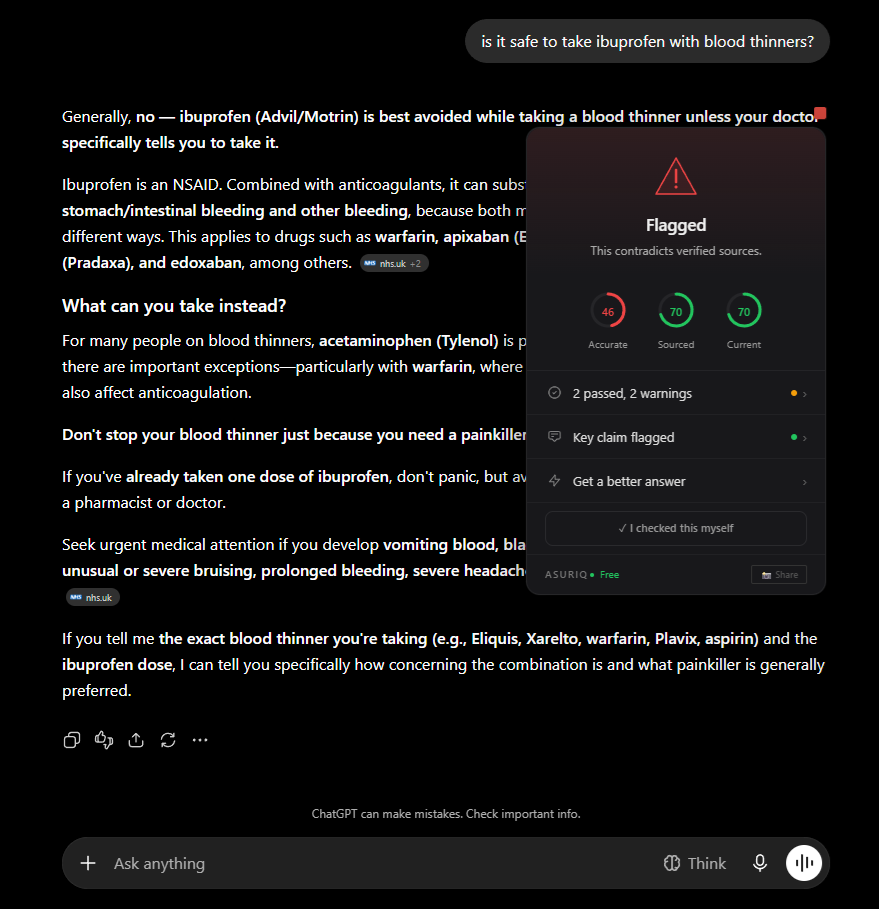
Watch a real verification.
Before troubleshooting, see what a working verification looks like from start to finish.
Common issues by product
Most problems have a quick fix. Find your product below.
Extension
Supported sites: ASURIQ works on ChatGPT (chat.openai.com), Claude (claude.ai), Gemini (gemini.google.com), DeepSeek, and other supported AI platforms. It won't activate on non-AI sites.
Try: Refresh the page. If badges still don't appear, disable and re-enable the extension in chrome://extensions.
• The engine may be temporarily unavailable. Wait a minute and try again.
• Your network may be blocking the connection. Check if you're behind a corporate firewall or VPN.
• Test connectivity: open a terminal and run
curl https://consensus-production-6eeb.up.railway.app/healthIf badges work in Chrome but not another Chromium browser, check that the extension is installed and enabled in that browser's extension manager. Each browser has its own extension installation. They don't share.
Safari is not currently supported.
Most people only need the browser extension covered above. The other paths matter once you're also running ASURIQ through a connector, the API, or an agent.
Routing
sk-, Anthropic keys start with sk-ant-.Permissions: Some provider dashboards let you restrict key permissions. ASURIQ needs chat/completions access at minimum.
Billing: If your provider account has no payment method or has hit a spending limit, API calls will fail. Check your provider's billing dashboard.
Check your provider's status page for current model availability. If a specific model is unavailable, ASURIQ's routing will attempt to find an equivalent alternative when possible.
Memory
Memory Hosted: Requires an active ASURIQ account with a Memory Hosted subscription. Check that you're logged in and your subscription is active at asuriq.dev/account.
Storage limits: Memory Local holds up to 5,000 entries. Memory Hosted holds up to 10,000.
If important memories aren't surfacing, try rephrasing your query to include terms that match the original memory. Memory recall is keyword-sensitive. It matches against the content of stored entries, not semantic meaning (semantic search via ONNX embeddings is planned for a future release).
Hands
Hands Hosted (credits): Tools execute on ASURIQ's servers. If a server action fails, credits are automatically refunded. Check your credit balance at asuriq.dev/account.
1. Check your MCP configuration file. On macOS:
~/Library/Application Support/Claude/claude_desktop_config.json. On Windows: %APPDATA%\Claude\claude_desktop_config.json.2. Restart Claude Desktop after any config changes. MCP servers are loaded at startup.
3. Make sure your ASURIQ API key is correctly set in the config.
WorkForce
• Complex deliberations (5+ models, multiple rounds) can take several minutes. The progress indicator shows which phase is active.
• If a provider times out, the simulation continues with available models and notes the missing perspective in results.
• You can close the tab and return. Simulation state is saved. Check your account for completed results.
WorkForce uses a bid system: you see the estimated cost before the simulation runs and approve it. If the actual cost is lower than the bid, the difference is refunded. If the simulation fails entirely, the full bid is refunded.
Check your transaction history at asuriq.dev/account.
Code Quality
The quality gate system will tell you if the active model doesn't meet the minimum tier for a given analysis framework. In that case, you'll see a message explaining which tier is required and how to unlock it via Routing.
Verify
If every entity in a response shows "not found," the most likely cause is a temporary issue with our database connectivity. Try again in a few minutes.
If the problem persists, note that database coverage varies by domain. Scientific claims have the broadest coverage. Niche or very recent topics may have limited reference data. This is a coverage limitation, not a bug.
Two honest ways forward: connect a vision-capable model through Routing so screenshot-to-claim extraction can run, or select the text yourself and submit it directly. There's no silent guess in between — if we can't read it, we say so.
This is a disclosed buffer, not a service gap — a verification authority doesn't race to be first. It clears on its own as soon as enough independent sources catch up. See how it works §7 for the full freshness policy.
Worth keeping straight: "we cannot verify this from public sources" is not the same claim as "this is unverifiable," and neither is the same claim as "this is false." A correction changes the record when new public evidence changes the math, not because someone disagreed with the verdict. Full policy and how to submit: /corrections.
Check it yourself.
Before reaching out, run through these quick checks.
Extension version
- Open chrome://extensions in your browser
- Find ASURIQ in the list
- Check the version number: current release is v1.0.0
- If outdated, click the update button or reinstall from the store
API connectivity
- Open a terminal or command prompt
- Run: curl https://consensus-production-6eeb.up.railway.app/health
- You should see a JSON response with "status": "ok"
- If the request times out, the engine may be restarting (Railway cold starts take ~15s)
Provider status
- OpenAI: status.openai.com
- Anthropic: status.anthropic.com
- Google AI: cloud.google.com/status
- DeepSeek: Check their Discord or status page
- If your provider is down, ASURIQ can't process requests through that provider
Account & billing
- Sign in at asuriq.dev/login
- Check your subscription status at asuriq.dev/account
- Verify credit balance if using credit-based products
- Check that your payment method is current in Stripe
Known limitations.
We'd rather you know upfront than find out the hard way.
AI providers update their APIs without warning
When OpenAI, Anthropic, Google, or DeepSeek change their APIs, models, or rate limits, ASURIQ products that depend on those providers may be temporarily disrupted. We monitor for changes and adapt as fast as we can, but some disruption is expected. This is inherent to building on third-party AI infrastructure.
Rate limits are imposed by your AI provider, not ASURIQ
If you hit rate limits while using Routing or WorkForce, those limits come from your provider account (OpenAI, Anthropic, etc.), not from ASURIQ. We respect and relay provider rate limits. We can't override them. Upgrading your provider plan or adding additional provider keys through Routing can help.
Database coverage varies
Verify checks claims against 269 evidence databases, but not every claim can be verified. Coverage is strongest for scientific, medical, and widely-documented factual claims. Niche topics, very recent events, and opinion-based claims may return limited or no results. A 'not found' result means we couldn't find evidence. It doesn't mean the claim is false.
Cold starts on the verification engine
ASURIQ's verification engine runs on Railway. After periods of inactivity, the first request may take 10-15 seconds as the server wakes up. Subsequent requests are fast (~2 seconds). This is a known infrastructure trade-off for a product at this stage.
WorkForce is in early access
Multi-model deliberation is computationally expensive and architecturally complex. Results depend on the models available through your provider keys. Panel diversity improves accuracy, but we can't guarantee consensus quality when only one or two models are available.
Still stuck?
We read every email. Response time is typically under 24 hours.
Disclaimers
ASURIQ is a quality layer, not a guarantee
Verification badges, cognitive frameworks, and code analysis improve the quality of AI outputs. They do not guarantee correctness. AI outputs should always be verified by humans for critical decisions: medical, legal, financial, or safety-related.
Your AI provider's terms still apply
ASURIQ sits alongside your AI provider, not in place of it. Your usage of ChatGPT, Claude, Gemini, or any other provider remains subject to their terms of service, privacy policies, and usage limits.
We're in beta
ASURIQ is currently in friends-and-family beta. Features may change, and we're actively building. Your feedback directly shapes what we build next.
Currently in friends-and-family beta. Built on peer-reviewed cognitive architecture.